
 Blogs
Blogs 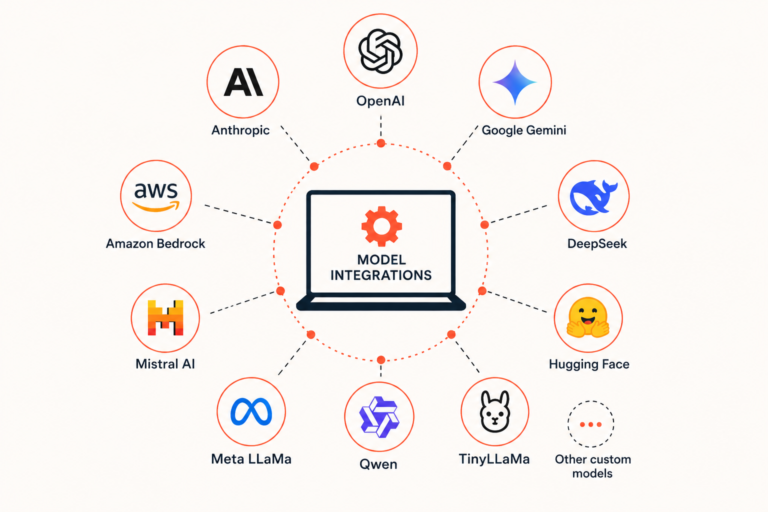
InsightFinder integrates with the most widely used large language models: OpenAI, Anthropic, Google Gemini, Amazon Bedrock (including Claude), and a growing list of open-source models like DeepSeek, Mistral, or TinyLLaMa. This post covers which models are supported, how to evaluate them inside the platform, and how to use them to power your incident responses processed with ARI.
Which Models Are Supported
InsightFinder’s LLM Labs environment connects to both commercial and open-source LLMs. On the commercial side, supported providers include:
- OpenAI (GPT models)
- Anthropic (Claude models)
- Google Gemini
- Amazon Bedrock (which includes access to Anthropic’s Claude models)
For teams that prefer open-source or self-hosted models, InsightFinder can host models like:
- DeepSeek
- Mistral AI
- Hugging Face
- Meta LLaMa
- Qwen
- TinyLLaMa
- Other custom models
Open-source models can be hosted directly on the InsightFinder platform, with no external API key required. Because utilizing open-source architectures allows enterprises to maintain strict data privacy, eliminate black-box dependencies, and retain control over their core infrastructure, this direct-hosting path gives you a seamless way to bring those specific models into your custom evaluation environment without additional infrastructure setup.
LLM Refinement Use Cases with InsightFinder
Connecting your LLMs to InsightFinder unlocks three practical capabilities: evaluating how your existing models perform against the prompts your applications actually use, fine-tuning those models on your own data when out-of-the-box performance isn’t good enough, and deploying the best-performing model (whether foundational or fine-tuned) as the intelligence behind ARI, InsightFinder’s SRE Agent. The sections below walk through each.
Evaluating Models Against Your Actual Prompts
The primary use case for LLM integration inside InsightFinder is prompt evaluation. InsightFinder lets you go beyond just testing models in isolation. With InsightFinder, you can compare multiple models across multiple dimensions and against the specific prompts and datasets your applications will actually use in production.
Inside LLM Labs, you can run multidimensional comparisons across three variables simultaneously: prompt template, dataset, and model. The platform scores results in a ranked sequence:
- Accuracy—responses are evaluated for hallucinations and quality issues first. Any model that fails this check is eliminated from consideration.
- Latency—among models that pass the accuracy threshold, the fastest response time typically wins.
- Cost—if models are tied on accuracy and latency, then token usage is taken into consideration to present the cheapest option as the recommendation.
This gives your team a structured, repeatable way to answer the question that usually gets decided by gut feel: which model actually performs best for this specific task?
Fine-Tuning Models on Your Own Data
If none of the out-of-the-box models perform well enough on your prompts, InsightFinder supports fine-tuning. The workflow is straightforward: identify sessions where model performance didn’t meet expectations, generate a fine-tuning dataset from those traces, create a fine-tuning job, and deploy the resulting model back into LLM Labs to validate the results.
Fine-tuning is currently supported for OpenAI and Google Gemini models. Support for open-source models hosted on the platform is coming soon. For other providers, fine-tuning availability depends on whether the provider exposes that capability. For example, Amazon Bedrock supports fine-tuning for select models within its ecosystem.
Once a fine-tuned model is created, it appears alongside your other available models in LLM Labs and can be evaluated using the same prompt comparison workflow described above.
Using Any Supported LLM to Power ARI
LLMs integrated with InsightFinder (off-the-shelf or fine-tuned) can also be configured as the intelligence layer for ARI, InsightFinder’s SRE Agent. This means your team isn’t locked into a single LLM for incident investigation, root cause analysis, or automated remediation workflows. Domain admins can select the model for ARI that performed best in your evaluations, or use a fine-tuned model trained specifically on your environment’s incident history.
ARI then uses that model for chat, incident analysis, and any agent workflows you have running.
Getting Started
If you’re already using one of the supported providers, connecting your model to InsightFinder requires only your API key and a few seconds of configuration. If you’re working with open-source or internally developed models, the platform can host them directly.


