
 Blogs
Blogs 
Most teams don’t just “ship a prompt.” They ship behaviors that must hold up under messy reality: shifting user inputs, new edge cases, model updates, and the constant pressure to cut latency and cost without degrading quality. In practice, that means prompt work becomes software work. It needs version control, test data, repeatable evaluation, and clear winners that can be defended in a review with engineering leadership.
InsightFinder’s new Prompt Comparison capability inside LLM Labs is built for that exact problem. It lets teams track prompt changes, record prompt versions, and compare multiple prompt versions across a matrix of models and datasets, then surface a top performer based on the evaluation results, not over a guess work.
Prompt iteration needs measurement
When an AI engineer says “Prompt B is better,” the natural follow-up is “better where?” A prompt can look great on a handful of hand-picked examples and still fail in production because the failure mode only appears in a different slice of data, or because a different model family reacts in a subtly different way.
Even worse, prompt iteration often collapses multiple goals into one subjective judgment. A response may be more accurate but slower. It may be concise but lose critical context. It may be high quality but 10 times more costly. Without structured evaluation, teams end up shipping whichever prompt “feels” right, then paying for it later in support tickets, regressions, and long debugging loops.
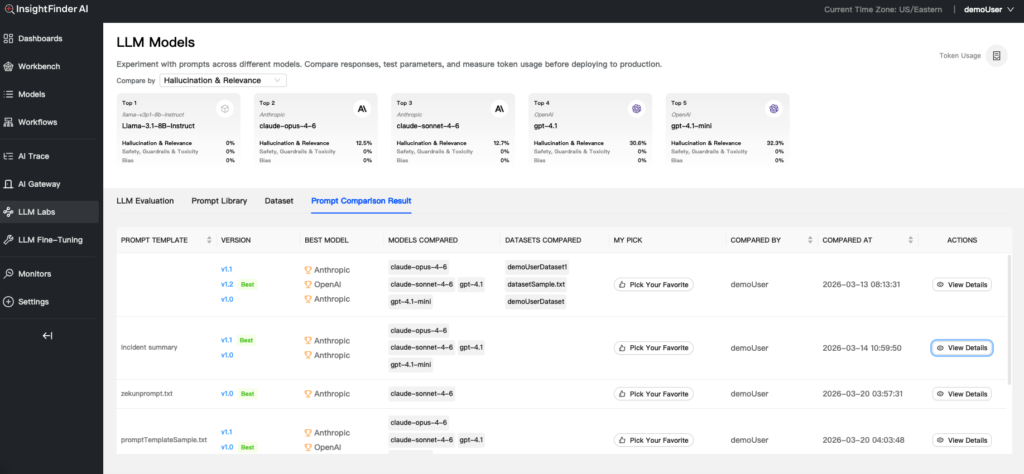
LLM Labs provides measurable data against prompt packs to remove guesswork and show you real performance data.
When it comes to prompt engineering, the tooling gap isn’t around writing prompts. The gap is in evaluating and proving which prompts work best.
Why comparing prompts in one dimension fails in production
Single-axis evaluation usually looks like this: pick one model, pick a handful of examples, adjust the prompt, and eyeball the output. That approach breaks down for three predictable reasons.
First, prompts behave differently across models. A change that improves adherence to instructions on one model can introduce verbosity, hedging, or missing fields on another.
Second, prompts behave differently across datasets. A prompt that performs well on a clean internal test set can fail on real-world inputs filled with partial context, ambiguous language, or domain-specific jargon.
Third, “best” prompt depends entirely on the trade-off. Teams need to weigh response quality, token usage, and latency together because those constraints define whether an LLM feature can scale.
What teams actually need is multidimensional prompt evaluation: the ability to see which prompt version wins across the combinations they care about, and why.
Multidimensional prompt comparison in LLM Labs
LLM Labs now supports a workflow that treats prompts like first-class artifacts: versioned, testable, and comparable across real evaluation dimensions. The feature connects three things that usually live in separate spreadsheets and notebooks: prompt version control, dataset management, and side-by-side evaluation across a model and dataset matrix.
Prompt template version control that supports real experimentation
Inside the Prompt Library, teams can create an initial prompt template and then iterate safely. Small refinements can overwrite an existing version, while meaningful changes can be captured as a new version for comparison testing. Prompt work often has two tempos: fast tuning during development and deliberate branching when a team wants to test a real alternative approach. InsightFinder supports both, which makes it easier to run clean experiments without losing the prompt history.
Dataset integration for prompt evaluation
Prompt evaluation is only as good as the test inputs behind it. LLM Labs includes dataset management so teams can upload testing data and then tag which prompt template is applicable for that dataset. That lightweight linkage helps teams maintain a working map between prompt intent and the data it is meant to handle. It also makes it easier to avoid a common failure: running a comparison on a dataset that does not represent the actual use case.
Comparison workflows with a full test matrix
In the LLM Evaluation area, teams can start a comparison session and evaluate different prompt templates across multiple model and dataset combinations. The intent is straightforward: test the matrix, then see how each prompt version performs under the constraints that matter. The comparison workflow tracks response quality, token usage, and latency, which pushes teams toward decisions that hold up in production environments, not just demo environments.
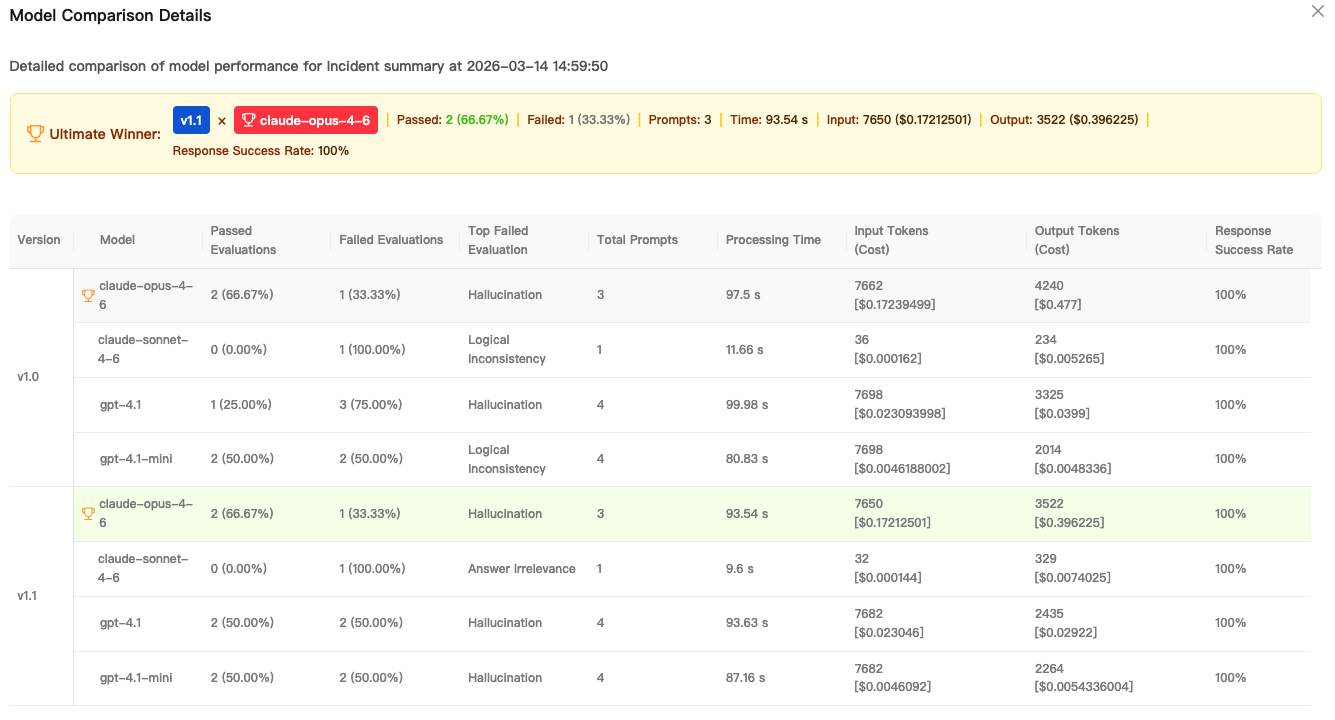 InsightFinder’s Prompt Comparison feature lets you version prompt packs, make multi-dimensional comparisons, and sorts results to determine the best “winner” for your scenario.
Choosing the “winning” prompt
The most useful moment in any evaluation workflow is when a team can stop debating and start acting. LLM Labs addresses this by automatically highlighting the top-performing prompt version with a “Winner” badge on the View Details page, derived from the multidimensional analysis across the chosen model and dataset matrix.
This is not about declaring a universal best prompt. It is about declaring a best prompt for the evaluation environment the team defined. That framing is important because executive stakeholders typically want a crisp answer, while engineering stakeholders want the evidence. The “Winner” designation bridges both needs: it communicates a decision while staying anchored to measurable results.
Evaluation summaries explain prompt performance
Comparisons become actionable when they are explainable. LLM Labs surfaces an Evaluation Summary table that lets teams compare critical performance metrics across datasets and models, including how many prompts were tested, pass and fail rates, and the most common failure type.
This is where prompt work starts to look like engineering work. Pass rate trends reveal which prompt version generalizes. Failures show where the prompt breaks. A “top failed evaluation” pattern can uncover the specific weakness that needs to be fixed, such as missing structured fields, poor grounding, or instruction-following lapses.
For AI leaders, this helps answer the question they are always asked: “How do we know this change is safe to ship?” For engineers, it narrows the iteration loop because it identifies what to improve instead of forcing guesswork.
Comparison history for repeatability
One-off or ad-hoc evaluations help in the moment, but durable systems rely on repeatability. LLM Labs includes a Prompt Comparison Result view that stores performance history across models and datasets, along with best model recommendations for each version and a path to inspect details.
That history is useful because LLM projects rarely stand still. Models get upgraded. Datasets evolve. New customer segments change the shape of inputs. Without a history of comparisons, teams can’t easily detect regressions or justify why they chose a given prompt version for production at a specific time.
LLM Labs also supports a “Pick Your Favorite” action to mark the most effective version for production needs. That seemingly small detail is a practical control point. It turns evaluation output into an explicit selection step, which helps teams avoid accidental drift when multiple prompt versions exist.
Why this matters for AI engineering and executive leaders
Prompt iteration has moved from a niche practice to a core production concern. Many teams now run customer-facing workflows powered by LLMs where small prompt changes can alter business outcomes: support deflection, incident triage accuracy, sales ops automation quality, or internal developer productivity.
For engineering teams, multidimensional comparison reduces the cycle time between idea and verified improvement. It turns prompt work into a controlled experiment instead of a subjective debate. For executive stakeholders, it makes prompt changes legible. It becomes possible to ask and answer the right questions: Which prompt version is safest? Which model pairing meets the latency budget? Which choice reduces token cost without harming quality?
The best prompt is not the most creative or the sharpest. It’s the one that wins under your real operational constraints.
Try prompt comparison in LLM Labs
InsightFinder’s Prompt Comparison feature in LLM Labs gives teams a practical way to evaluate prompt versions across models and datasets, measure quality alongside token usage and latency, and confidently select a winner backed by evaluation results and history.
If your team is tuning prompts by gut feel or running ad hoc tests in notebooks, it is time to bring the process into a workflow that scales.
Sign up for InsightFinder and try Prompt Comparison in LLM Labs for free, then request a demo if you want help setting up evaluation datasets and comparison matrices that match your production reality.


